


 WINDOWS
 Office
 Windows Server
 Antivirus
 Utilities
 Professional Software
 PACKS
 Plantillas Excel
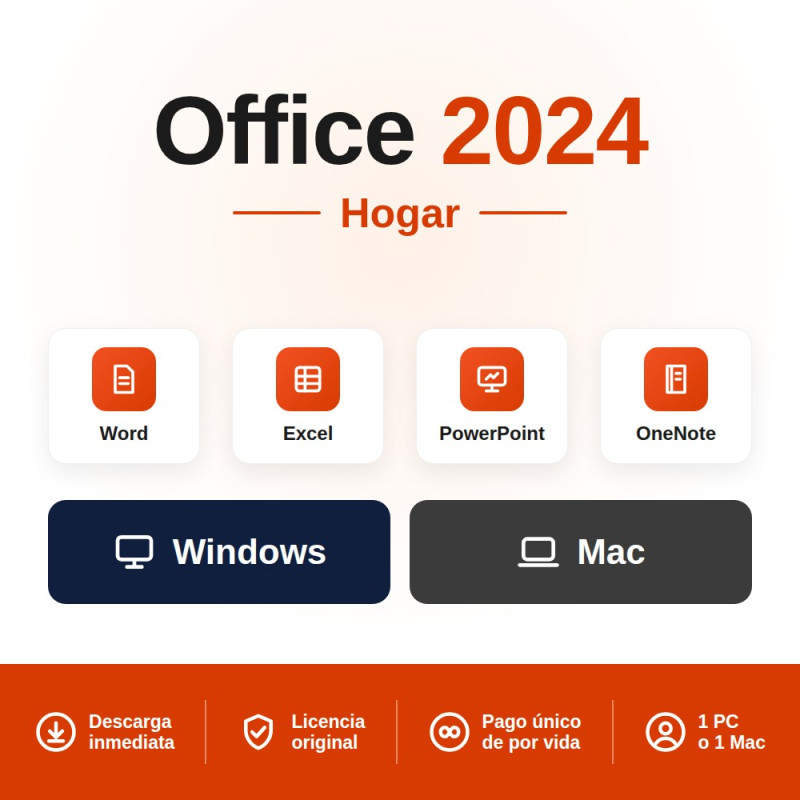
Genuine, perpetual Office 2024 Home for 1 PC or Mac: Word, Excel and for personal use. It links to your Microsoft account, can be moved to another computer and on Mac runs on macOS Golden Gate, Tahoe, Sequoia, Sonoma and Ventura.
Windows & Mac Runs on macOS Golden Gate Linked to your Microsoft account Supported until 2029
Rated 9.8/10 on eKomi (Gold seal) · Spanish company · Genuine, legally resold licence · Lifetime guarantee.
Microsoft Office Home 2024 is the perpetual edition of the world's most widely used productivity suite, designed specifically for home users and small households. You pay once and the licence is yours forever: no monthly fees, no annual renewals and no surprises on your statement.
This FPP (Full Packaged Product) licence is activatable on 1 PC or Mac and is linked to your Microsoft account, which means you can transfer it to another device if you change your computer.
| Application | What it's for |
|---|---|
| Word 2024 | Word processor for writing documents, letters, CVs, academic papers and any kind of formatted content. |
| Excel 2024 | Spreadsheets with formulas, charts and pivot tables. Ideal for budgets, personal accounting, data analysis and planning. |
| PowerPoint 2024 | Create visual presentations with slides, animations, transitions and professional templates. |
| OneNote | Digital notebook for taking notes, organising ideas and syncing them across devices through your Microsoft account. |
Office 2024 comes in three different editions. This comparison helps you choose the right one for your needs:
| Application | Home | Home & Business | Pro Plus |
|---|---|---|---|
| Word, Excel, PowerPoint | YES | YES | YES |
| OneNote | YES | YES | YES |
| Outlook | NO | YES | YES |
| Access & Publisher | NO | NO | YES |
| Best for | Students, basic home use | Home, freelancers, small business | Professionals and companies |
This is the most common question when buying Office. The difference is simple: Office 2024 is paid once and the licence is yours forever. Microsoft 365 is a subscription billed monthly or annually that stops working when you stop paying.
| Feature | Office Home 2024 | Microsoft 365 |
|---|---|---|
| Payment model | One-off payment | Monthly or annual subscription |
| Duration | Forever | While you keep paying |
| Updates | Security and bug fixes | Continuous new features |
| Devices per licence | 1 PC or Mac | Up to 5 devices |
| OneDrive storage | 5 GB free | 1 TB included |
| Long-term cost | Much lower | Indefinite recurring payment |
Our recommendation: if you only need Word, Excel and PowerPoint for home use, Office 2024 Home is far more cost-effective. Pay once and forget about it. Microsoft 365 only makes sense if you specifically need the 1 TB of OneDrive storage or plan to install it on many devices simultaneously.
| Specification | Detail |
|---|---|
| Edition | Microsoft Office Home 2024 |
| Licence type | FPP perpetual (lifetime, no subscription) |
| Devices per licence | 1 PC or Mac |
| Included applications | Word, Excel, PowerPoint, OneNote |
| Linked to | Your personal Microsoft account |
| Transfer | Transferable to another device by deactivating the previous one |
| Languages | Multi-language (includes English, Spanish, Portuguese, French, German, Arabic, Bahasa and more) |
| Architecture | 32-bit and 64-bit |
| Validity | Valid for compliance audits |
| Requirement | Specification |
|---|---|
| Operating system (PC) | Windows 10 or Windows 11 (not compatible with Windows 7, 8 or earlier versions) |
| Operating system (Mac) | macOS Sonoma (14) or later. Compatible with Apple Silicon and Intel |
| Processor | 1.6 GHz or higher, dual-core |
| RAM | 4 GB (8 GB recommended) |
| Storage | 4 GB free disk space |
| Minimum resolution | 1280 x 720 pixels |
| Internet connection | Required for initial activation and to download the installer |
The full process is completed in four simple steps:
After completing your payment, you'll receive your official Microsoft product key, download instructions and your legal invoice directly in your inbox within minutes. We accept credit and debit cards, PayPal, bank transfer, M-Pesa, mobile money and local payment methods across Asia and Africa.
Go to setup.office.com and sign in with your Microsoft account. If you don't have one, you can create it for free right there. Enter the product key you received by email. Office Home 2024 will be permanently linked to that account.
From your Microsoft account dashboard, download the official installer for Windows or Mac. The download comes directly from Microsoft's servers, ensuring a clean, safe file.
Run the installer and wait for it to finish. When you open Word, Excel or any other app for the first time, Office activates automatically by detecting your signed-in account. That's it — your licence is permanently activated and you can start working right away.
Delivery is 100% digital and immediate. You receive your product key and instructions by email within minutes of confirming your payment, anywhere in the world.
We accept payments in your local currency from over 30 countries:
At La Tienda de las Licencias we operate as an independent reseller under the Court of Justice of the European Union ruling C-128/11 (UsedSoft v. Oracle), which establishes that perpetual software licences can be lawfully resold within the EU once the original copyright holder's distribution right is exhausted.
This means your Office Home 2024 licence is:
It's perpetual. You pay once and the licence is yours forever, with no monthly or annual fees. You'll receive security and bug-fix updates throughout Microsoft's official support cycle. New features arrive in future versions (Office 2027, etc.), not as free updates to this version.
No. Microsoft excluded Outlook from the Office 2024 Home edition. If you need Outlook to manage your email, we recommend Office Home & Business 2024, which includes it (and costs up to 50% less at LTL), or Office 2024 Professional Plus, which also adds Access and Publisher.
Yes. Office Home 2024 is compatible with Windows 10, Windows 11 and macOS Sonoma or later (both Apple Silicon and Intel). The licence activates one device at a time: you can install it on a PC or a Mac depending on your needs.
Yes. The FPP licence is linked to your Microsoft account. When you switch computers, deactivate Office on the old device through your account and reinstall it on the new one. The transfer is free and straightforward.
No, they are different products. Office 2024 is a one-off perpetual licence. Microsoft 365 is a recurring subscription. Both coexist, and you choose the one that suits your usage best.
Yes. The EU Court of Justice ruling (case C-128/11, UsedSoft v. Oracle, July 2012) established that the resale of perpetual software licences is lawful within the European Union. La Tienda de las Licencias is a registered Spanish company (MYA WIFI S.L.U.) that issues an official VAT invoice and provides a lifetime guarantee.
Delivery is 100% digital and immediate. As soon as your payment is confirmed, you receive an email with your official product key, download instructions and your invoice. There's no physical shipment: it works the same whether you order from Kenya, Nigeria, Malaysia, Indonesia, the UK, Spain or anywhere else in the world. Automatic 24/7/365 delivery.
We provide a lifetime guarantee on the licence and free technical support by email, WhatsApp and phone. If the key stops working for any reason, we replace it at no cost. We also have step-by-step tutorials to guide you through the installation.
Yes. We support local payment methods in Kenya (including M-Pesa), Nigeria, Indonesia, Malaysia, the UK, Spain, Argentina, Chile, Peru, Mexico, Colombia and over 30 other countries. You can pay with your local card, mobile money, e-wallet, bank transfer or other popular methods in your region.
Specific References
Genuine, perpetual Office 2024 Home for 1 PC or Mac: Word, Excel and for personal use. It links to your Microsoft account, can be moved to another computer and on Mac runs on macOS Golden Gate, Tahoe, Sequoia, Sonoma and Ventura.
Windows & Mac Runs on macOS Golden Gate Linked to your Microsoft account Supported until 2029
Rated 9.8/10 on eKomi (Gold seal) · Spanish company · Genuine, legally resold licence · Lifetime guarantee.